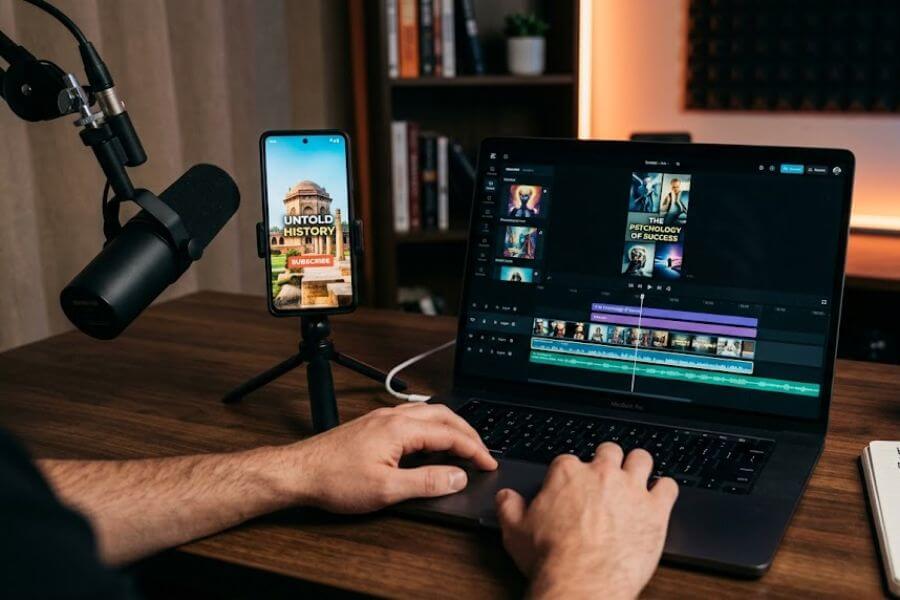
Think about the last time you browsed through YouTube Shorts. You probably watched a quick historical fact, a motivational quote over a relaxing background, or a list of crazy survival tips. Did you see the face of the person who made that video? Probably not. You just witnessed a faceless video in action.
Right now, creators are pulling in millions of views and massive subscriber counts without ever showing their faces, picking up a camera, or using their actual voices. This is not a lucky trend. It is a massive shift in content creation, and it is happening because artificial intelligence video tools have become incredibly smart.
If you want a piece of this massive viewer attention, you do not need expensive studio lights, high-end cameras, or advanced editing skills. You just need a strategy, a laptop or phone, and the right workflow. This guide breaks down exactly how to use smart software to build a highly successful, automated, cash-generating channel from scratch.
Finding Your Profitable Content Corner
Before you touch a single piece of software, you have to decide what your videos will be about. In the internet world, this is called choosing your niche. If you try to make videos for everyone, you end up making videos for no one. You need a specific topic that people already love to watch.
The best topics for faceless videos have a few things in common. They rely heavily on interesting facts, strong visuals, and emotional hooks. They do not need a human host to feel alive.
Top Niches That Dominate the Feed
- Dark Psychology and Mind Tricks: People love learning why human beings act the way they do. Videos about body language, persuasion secrets, and social behaviors get massive engagement.
- Alternative History and Untold Stories: Instead of repeating standard school lessons, these videos look at weird historical events, strange ancient mysteries, or hidden facts about famous leaders.
- Financial Freedom and Money Mindset: Quick tips on saving money, understanding investments, the habits of wealthy people, and side-hustle ideas always attract a hungry audience.
- The Unexplained and Cosmic Horrors: Deep-sea mysteries, space anomalies, scary folklore, and survival scenarios keep viewers glued to their screens until the very last second.
- Self-Growth and Daily Discipline: Short, powerful messages that inspire viewers to work out, study harder, or break bad habits perform incredibly well because people love to share them on their own profiles.
Assessing Niche Potential
| Topic Category | Audience Interest | Visual Variety | Competition Level |
| Mind Psychology | Very High | High (Abstract) | Medium to High |
| Hidden History | High | High (Vintage/AI Art) | Medium |
| Wealth Habits | Extremely High | Medium (Text/Stock) | Very High |
| Space Mysteries | High | Very High (Cinematic) | Low to Medium |
| Daily Motivation | Extremely High | Medium (Cinematic) | High |
To pick your perfect corner, look at what you already enjoy watching. It is much easier to create content when you actually like the topic. Once you have your focus, you are ready to start brainstorming specific ideas.
Brainstorming Ideas That Stop the Thumb
You cannot just guess what people want to watch. You need to use data to find out what is already working. Your goal is to find topics that have high search volume but could be done better or with a fresh twist.
Start by opening YouTube in an incognito window. This prevents your personal watch history from messing up the results. Type in keywords related to your chosen topic and filter the results to show only Shorts uploaded in the last month. Look for videos that have significantly more views than the channel has subscribers. That is a clear sign that the topic itself is viral.
You can also use smart text generators to help you brainstorm. Feed the software a prompt like this: Give me thirty unique, high-concept ideas for sixty-second videos about strange deep-sea discoveries that sound fake but are completely real.
Never copy other creators word for word. Instead, look at the core concept that made their video successful. If a video about the three scariest things found in the ocean went viral, you can create a video about the three strangest survival adaptations of deep-sea creatures. You are taking a proven structure and filling it with brand-new value.
Crafting Scripts That Keep Viewers Hooked
A YouTube Short lives or dies by its retention rate. This is the percentage of the video that people actually watch. If viewers drop off after two seconds, the platform will stop showing your video to new people. To get people to stay, your script needs a strict, mathematical structure.
A perfect sixty-second script is broken into four distinct parts. Each part has a specific job to do, and you cannot afford to waste a single syllable.
The Dynamic Hook (0 to 3 Seconds)
The hook is the most critical part of your entire video. You have less than three seconds to convince a scrolling viewer to stop. Never start your video with an introduction like, Welcome back to my channel, today we are talking about psychology. That is an instant skip.
Instead, start in the middle of the action or drop a shocking statement. Use opening lines that trigger immediate curiosity:
- Most people realize this psychological trick way too late in life.
- Scientists just found something at the bottom of the world that should not exist.
- This single mistake is keeping ninety-nine percent of people broke.
The Looming Problem (3 to 15 Seconds)
Once you grab their attention, you have to create a reason for them to keep watching. Agitate their curiosity by introducing a problem or a mystery. Explain why the hook matters and what is at stake. If your video is about wealth, explain how traditional advice is failing them. If it is about history, point out how the textbooks hid the real truth. This builds tension and makes the viewer desperate for the answer.
The Core Payload (15 to 50 Seconds)
This is the main body of your video where you deliver on the promise of your hook. Break your information down into rapid-fire points. If you promised three items, deliver them back-to-back without any fluff.
Use short, punchy sentences. Cut out words like that, which, and basically. Every sentence should deliver a fresh piece of information or a striking mental image. Keep the pace fast so the brain does not have time to get bored.
The Loop Hook and Action Call (50 to 60 Seconds)
Most creators ruin their videos at the very end by saying, Thanks for watching, please subscribe and hit the bell icon. The moment a viewer hears that, they know the value is over, and they swipe away. This drops your retention rate right at the finish line.
Instead, use a seamless loop hook. Design your final sentence so that it flows perfectly back into the very first sentence of your video. If your opening line is …is the reason you cannot sleep at night, your closing line should be And this strange brain glitch… When the video restarts automatically, the viewer watches the beginning again without even realizing it. This pushes your retention rate past one hundred percent, which tells the algorithm to push your video to thousands of more feeds.
Turning Words Into Audio Masterpieces
Since you are not using your own voice, you need to use advanced text-to-speech software to read your script. The days of robotic, robotic-sounding computer voices are completely gone. Modern speech tools use deep learning to replicate human emotion, breathing patterns, and natural inflections.
When you paste your script into your speech software, do not just hit the download button immediately. You need to read through it and add specific punctuation marks to guide the computer. AI voices look at commas, periods, and exclamation points to know when to pause, change pitch, or stress a specific word.
Audio Optimization Checklist
- Punctuation Tweaks: Use ellipses (three periods) to create a dramatic pause before a major reveal.
- Voice Selection: Pick a voice that matches your topic. Use a deep, gravelly voice for scary or mysterious topics. Use an energetic, clear voice for finance or self-growth.
- Speed Modulation: Increase the playback speed slightly to around one-point-zero-five or one-point-one. Shorts need to move slightly faster than natural human speech to maintain high energy.
- Pronunciation Fixes: Listen closely to how the tool pronounces strange words or numbers. If it messes up a word like ancient, spell it out phonetically in the script box like ayn-shunt until it sounds exactly right.
Generating Mesmerizing AI Visuals
Now that you have a powerful audio track, you need visuals that match the intensity of your words. You should avoid standard, boring stock footage that viewers have seen a thousand times before. Instead, use generative art platforms to build custom, stunning images and video clips.
The secret to amazing visuals is the prompt you feed into the generator. If you type a simple phrase like scary ocean, you will get a generic, flat image. You need to be descriptive, specifying style, lighting, camera angles, and mood.
Prompt Formulas for Different Video Styles
For a historical or cinematic look, use a formula that describes texture and atmosphere: A close-up gritty portrait of an ancient Roman soldier in mud-covered iron armor, dark moody lighting, flickering torches, smoke background, hyper-detailed textures, cinematic film look, eight-k resolution.
For a modern, high-tech finance or psychology look, pivot to clean lines and neon elements: A minimalist dark room with a glowing neon blue human brain floating above a sleek desk, clean geometry, futuristic synthwave style, dramatic shadows, sharp focus.
Generate a brand-new image or video clip for every single sentence in your script. In Shorts, the visual must change every two to three seconds. If an image stays on the screen for too long, the viewer’s eyes adjust, their attention drifts, and they swipe away to the next piece of content.
Assembling the Video for Maximum Engagement
With your audio track and visual assets ready, it is time to bring everything together into an editing workspace. You can use modern, browser-based tools or traditional editing software. The layout must be strictly vertical, using a nine-by-sixteen aspect ratio with a resolution of ten-eighty by nineteen-twenty pixels.
The Editing Layer Breakdown
- The Video Track: Drop your visual clips onto the timeline. Trim them so that every visual switch aligns perfectly with a heavy word, a beat drop, or a punctuation pause in your voiceover. This creates a rhythmic, satisfying viewing experience.
- Subtitles and Captions: Over eighty percent of people watch short-form videos with the sound turned off. If you do not have captions on the screen, you are losing most of your potential audience. Use software that automatically generates captions from your audio.
- Caption Styling: Make the text big, bold, and placed right in the center of the screen. Use high-contrast colors like bright yellow or white text with a thick black outline. Set the tool to display only one or two words at a time. This forces the viewer to read along in real time, keeping their brain highly active.
- Sound Effects (SFX): Do not underestimate the power of audio details. Add a subtle camera click sound when a new image appears, a deep sub-bass boom during a scary reveal, or a paper rip sound during a transition. These tiny sounds trigger dopamine responses in the listener’s brain.
- Background Music: Choose a track that sets the emotional tone. Use ambient, low-tempo tracks for mystery, or high-energy, fast beats for self-improvement. Lower the volume of the music track down to around negative-twenty decibels so it never overpowers the main voiceover.
Cracking the YouTube Algorithm for Massive Reach
You can make the most beautiful video in the world, but it will not matter if no one finds it. You need to optimize your upload settings so the platform knows exactly who should see your content.
Title Mechanics That Drive Clicks
Your title should not be a boring description. It should be a psychological extension of your video’s hook. Keep it under fifty characters so it does not get cut off on mobile screens.
Use bracketed text to create extra curiosity or urgency. For example, instead of Tips for Better Sleep, use This One Bedroom Habit Destroys Your Brain [Stop Doing It]. The title should make a promise that the video immediately fulfills.
Tags, Descriptions, and Metadata
The platform relies heavily on the actual words spoken in your video to categorize it, but filling out your metadata correctly gives it an extra push. Keep your description short and clean. Write a two-sentence summary using your main keywords naturally, then add three relevant hashtags at the very bottom.
Do not overthink tags. Just add five to ten broad terms that describe your niche. The most critical factor is consistency. Uploading at the exact same time every single day helps the platform identify your core audience faster.
Converting Viewer Attention Into Cold Hard Cash
Views are great for your ego, but your goal is to turn those views into a sustainable business. Relying solely on the built-in ad revenue sharing program is a mistake because the payout per thousand views on short content can be quite low. You need to diversify your monetization streams from day one.
High-Converting Revenue Models
- Affiliate Marketing: Find a digital product, software, or book that perfectly fits your niche. Place your special tracking link in the pinned comment of your video. In your script, tell viewers, Check the pinned comment to find the exact tool used in this video. Every time someone buys through that link, you earn a percentage of the sale.
- Digital Products and Guides: Create a simple fifteen-page electronic book, a checklist, or a collection of prompts using a text generator. Set up a store on a free digital marketplace and link it in your profile. Since you own the product, you keep one hundred percent of the profit.
- Print-on-Demand Merchandise: Design catchy slogans, inside jokes, or cool graphics related to your niche using design tools. Link a clothing store to your channel. When a viewer orders a shirt, a third-party company prints it and ships it out, leaving you with a hands-off profit.
- Brand Sponsorships: Once you consistently hit twenty thousand to fifty thousand views per video, brands will start reaching out to you. You can dedicate the middle five seconds of your short video to showcasing a product that matches your audience’s interests for a flat fee.
Troubleshooting Common Growth Plateaus
Every single creator hits a point where their growth slows down or stops. The difference between those who quit and those who build massive businesses is how they react to the data. You must look at your analytics like a scientist.
If your videos are getting stuck at the common two-thousand view mark, your hook is failing. The platform tests your video with a small group of people. If that group swipes away immediately, the video dies. Go back and make your first three seconds louder, faster, and more shocking.
If your click-through rate is high but people leave before the middle of the video, your pacing is too slow or your visuals are too repetitive. Try shortening your sentences and switching your images every two seconds instead of every four seconds. Keep experimenting until the numbers start climbing again.
Setting Up Your Automated Content Machine
To run a successful channel without burning out, you must treat it like a factory production line. Do not make one video, upload it, and then start from scratch the next day. This destroys your momentum.
Instead, use a system called batching. Dedicate your Monday entirely to researching thirty ideas and writing thirty scripts. On Tuesday, run all thirty scripts through your voice generation software. On Wednesday, generate all your visual elements. Spend Thursday and Friday editing and scheduling your posts for the entire month.
By building a system, you remove emotion from the equation. You stop worrying about whether a single video performs well or poorly. You become a consistent content machine, and consistency is the ultimate secret weapon on the internet.
Frequently Asked Questions
Can faceless YouTube Shorts channels really get monetized?
Yes, faceless channels can absolutely join the partner program and make money. The platform cares about the quality and originality of the content, not whether a human face is on the screen. To ensure your channel passes the review process, you must avoid uploading low-effort content or unedited clips from movies and television shows. As long as you write original scripts, generate unique visuals using your own creative prompts, and edit the pieces together with music, sound effects, and captions, your content is considered entirely original and is fully eligible for monetization.
Which artificial intelligence video generator is the best for beginners?
The best tool depends heavily on your budget and how much manual control you want over the final product. There are all-in-one platforms that take a single text prompt and automatically generate a script, voiceover, and visual clips in one go, which is fantastic for getting started quickly. However, if you want a highly unique look that stands out from the competition, the best approach is using a combination of dedicated tools. Use a text tool for your scripts, an advanced voice platform for high-quality audio, a generative art platform for your images, and an intuitive editing workspace to assemble the pieces manually.
How many Shorts should I upload every week to grow fast?
When you are starting a brand-new channel, consistency matters much more than extreme frequency. A fantastic goal to aim for is uploading one high-quality video every single day. This gives the platform’s algorithm daily data to analyze, which helps it locate your target audience much faster. If your schedule is tight, uploading three to four times a week is perfectly fine, provided you stick to a strict schedule so your audience knows exactly when to expect your next post. Never sacrifice the quality of your hooks and edits just to upload multiple times a day.
Is it legal to use AI-generated images and voices for commercial use?
Most major content creation tools grant you full commercial rights to use the text, images, and audio tracks you generate while using their platform, even on a free plan. However, subscription tiers often provide cleaner licensing terms and higher-resolution downloads. Always take two minutes to read the terms of service page of the specific software you are using to confirm that commercial use is allowed. To stay completely safe, avoid using tools to replicate the voices of real celebrities, musicians, or living public figures, as this can lead to copyright strikes and platform bans.
Why are my Shorts stuck at exactly two thousand views?
The two-thousand view trap is a very common phase that almost every single new creator experiences. This happens because the platform distributes your video to a small test audience of a few thousand people to measure how they respond. If your retention rate is below seventy percent, or if more than half of the people choose to swipe away instead of watching the first few seconds, the platform stops distributing the video. To break past this level, you need to drastically improve your opening hook, use brighter or more contrasting colors in your text captions, and speed up the visual transitions during the first five seconds of your video.